














Clerked vs Stampli
Stampli is known for keeping each invoice's questions, approvals and history on one thread, and it does that well. But everything below is work your team handles every week that Stampli can't do.
Why teams pick Clerked over Stampli
Answers your vendors' emails
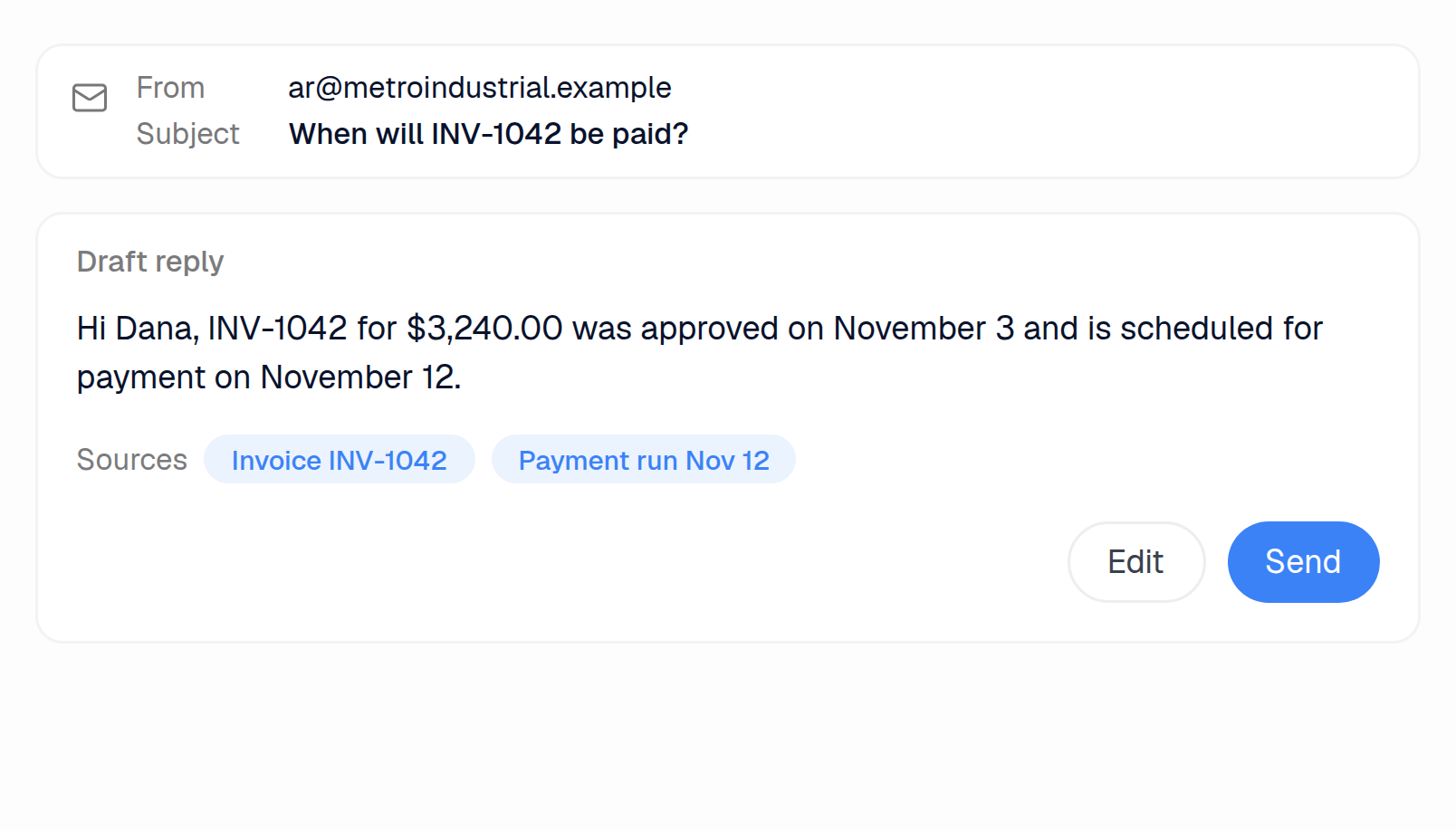
Stampli's portal lets vendors check payment status, and your team types every reply on the invoice thread. Clerked drafts the answer from your ERP and payment records, for your team to send, and keeps each unanswered email on a task list until someone replies.
Runs the shared AP inbox
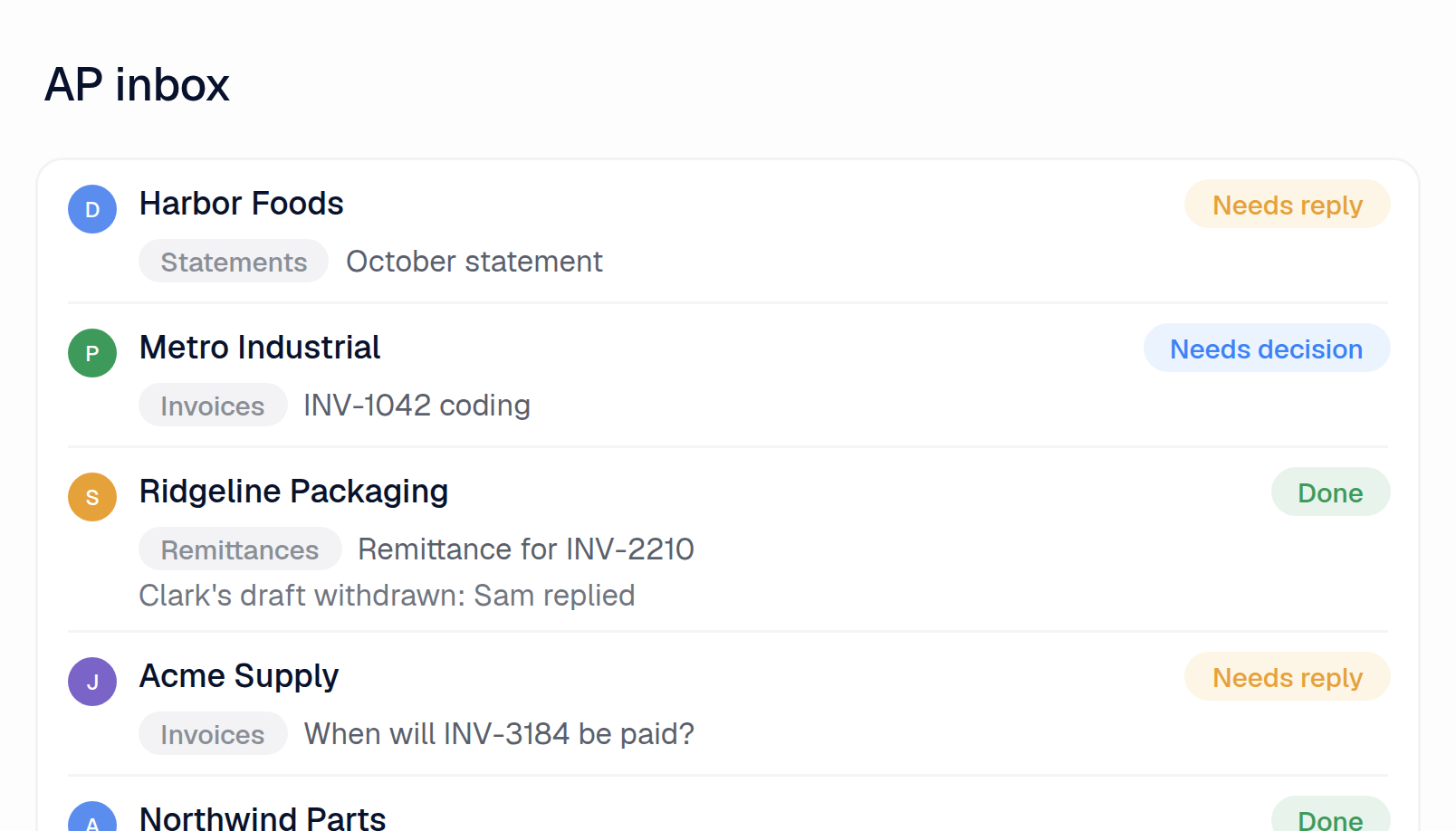
Stampli's inbox turns each PDF into an invoice record, and its AP Assignments file invoices with their vendor replies, not other vendor email. Clerked reads every email, marks what needs a reply or a decision, files each conversation into your team's folders and gives it an owner.
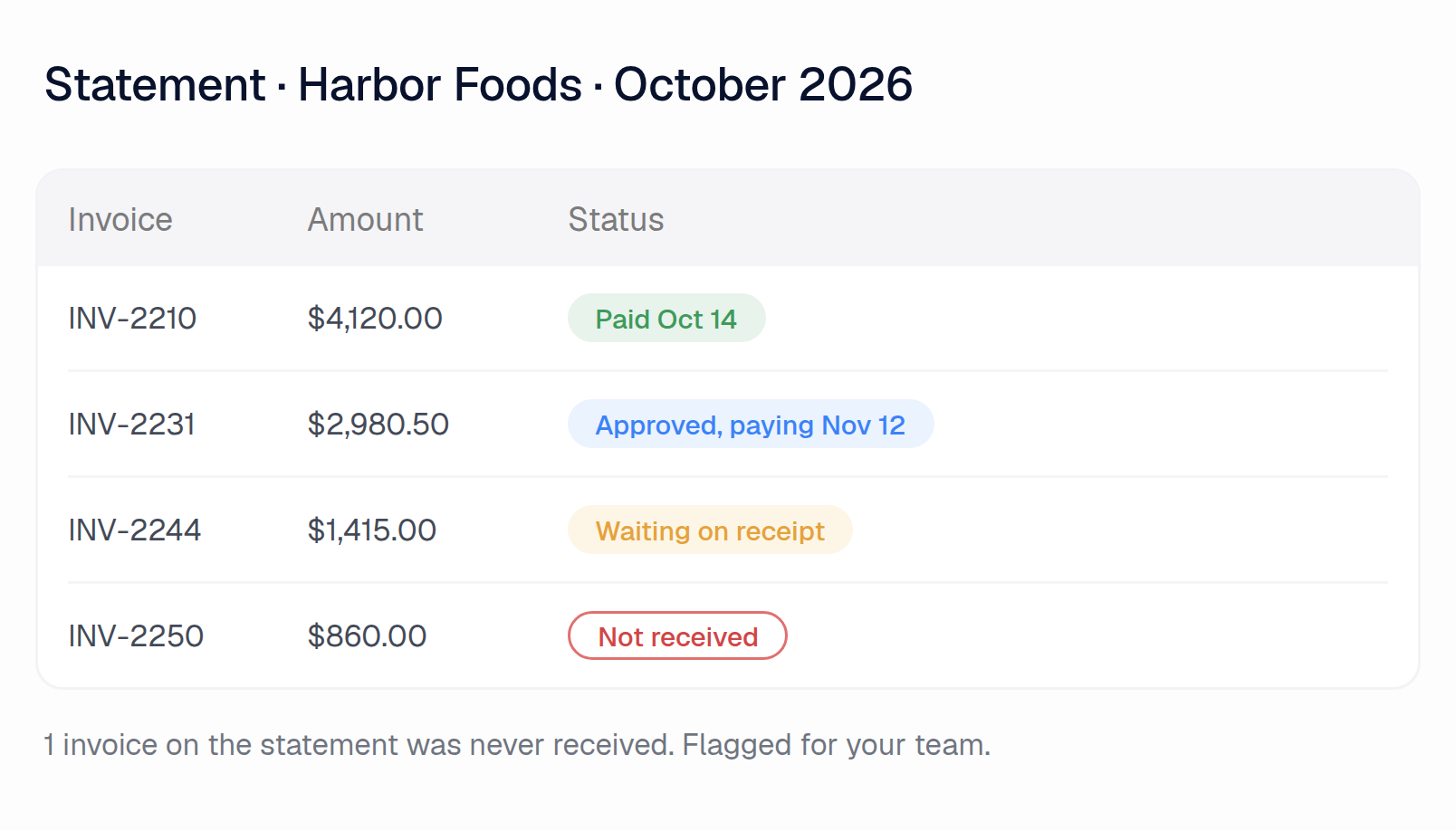
Checks vendor statements
Stampli has no statement reconciliation, and its guide tells buyers to check their configuration. Clerked checks every statement line against your open invoices and payments: what's paid, what's stuck, what you never received.
Other AP tools promise features. Here are our customers' results.
97.4%
of all fields our agents fill in, at header and line level, are accurate
84.7%
of invoices are fully touchless, sent to the ERP without a human touching them
5.3 min
From email to an invoice coded, matched and checked
99.8%
Invoices accepted by the ERP on the first try
Stampli vs Clerked, job by job
The AP inbox
Hundreds or thousands of emails hit the shared AP inbox
Clerked
Reads every email, pulls out the invoices, sets aside statements and reminders, and marks what needs a reply or a decision
Stampli
No. Every PDF sent to the Stampli inbox becomes an invoice record. Other attachments are dropped, and a person sorts the rest.1
Your team files vendor emails into folders
Clerked
Files each conversation into the folders your team sets up, and the inbox filters by them
Stampli
No. While invoices emailed to an AP Assignment's alias are filed there, with vendor replies on each invoice, Stampli doesn't file other vendor email.2
Each vendor email needs an owner
Clerked
Assign a conversation to a teammate and it lands on their task list. Whoever replies first becomes the owner
Stampli
No. While invoices route to users by AP Assignment, with vendor messages on each invoice, a vendor email outside an invoice gets no owner.2
A vendor sends a statement asking what's unpaid
Clerked
Checks every line against your open invoices and payments and links each one: what's paid, what's stuck, what you never received
Stampli
No. Stampli has no statement reconciliation. Its own guide tells buyers to check what their configuration offers.3
The invoice isn't a PDF: an Excel or Word file, a scan, a phone photo, or typed in the email
Clerked
Read like any PDF
Stampli
No. While uploaded Word, PNG and JPG files can be captured, Stampli's email intake takes PDFs only.4
The email says which job, plant or entity the invoice is for
Clerked
Used when the invoice is coded
Stampli
No. While a separate Stampli email alias can set a default entity and coding, nothing reads what the email says.5
One PDF holds several invoices and their backup pages
Clerked
Split into separate invoices, each keeping its own backup
Stampli
No. While Stampli can split a multi-invoice PDF into records, it tells buyers to test backup pages on their own samples.6
A payment reminder for a bill you already have
Clerked
Recognised as a reminder, not entered twice
Stampli
No. In Stampli, a reminder PDF becomes a new invoice record, flagged only if it exactly matches an earlier bill.7
Vendor communication
A vendor asks when they'll be paid
Clerked
Drafts the answer from your ERP and payment records, for your team to send
Stampli
No. While vendors on Stampli's portal can check payment status, nothing drafts a reply to their email.8
A teammate already answered the vendor
Clerked
Clark's draft is withdrawn when anyone on your team replies, from Clerked or your AP mailbox, so nobody answers twice
Stampli
No. While replies on the invoice thread show for the whole team, nothing drafts replies, and your AP mailbox stays outside Stampli.9
A vendor email sits unanswered
Clerked
Marked Needs reply and kept on a task list until someone answers it
Stampli
No. While Stampli notifies AP when a vendor messages on an invoice, it doesn't track a vendor email to your AP mailbox until answered.9
A vendor asks for a copy of an invoice or a remittance
Clerked
Drafts the reply and marks the document to attach. Invoice copies attach in one click
Stampli
No. Vendors on Stampli's portal can check invoice status and payment details. Otherwise, your team replies on the thread and attaches the file.10
Your team sends the same replies again and again
Clerked
Write them once in plain English. Each draft uses them with the invoice's real status
Stampli
No. Stampli has no saved replies for vendor messages.9
A new vendor writes in
Clerked
Flagged as a first-time sender, with the reply asking for your setup documents drafted for your team
Stampli
No. Vendor onboarding forms and document requests need Advanced Vendor Management, a paid add-on.11
Coding and matching invoices
A non-PO invoice, with no PO to match
Clerked
Coded the way your team coded the same charge before, starting with that vendor's history
Stampli
No. While Billy predicts each field from your past invoices, it shows only confident predictions, as suggestions for AP to check.12
The invoice has no PO number
Clerked
Searches that vendor's open POs and links the one it bills
Stampli
No. While Billy can detect a PO from vendor and content when no number is quoted, full matching by Billy costs extra.13
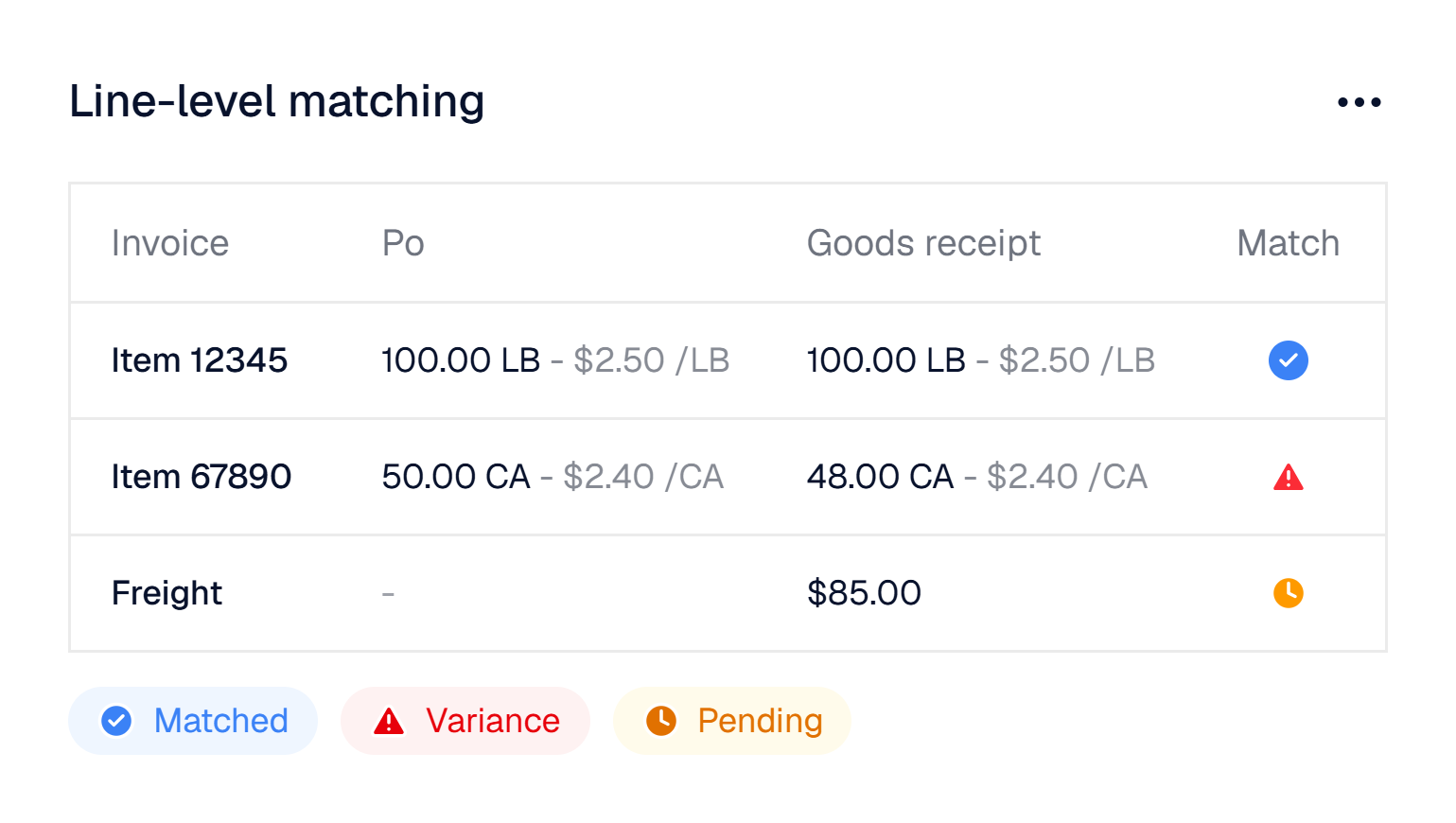
Invoice lines don't match the PO line for line
Clerked
Maps each line to the right PO line, even when lines are rolled up, split or renamed
Stampli
No. While semi-automated 2-3 way matching is included, full line matching by Billy is a paid upgrade.14
Part of the order shipped, and the invoice arrives before the receipt
Clerked
Tracked on each PO line. The invoice waits and releases itself when the goods are received
Stampli
No. While receipts are tracked per PO line, automatic matching by Billy is a paid upgrade over semi-automated matching.14
The invoice and the PO use different units of measure
Clerked
Flagged, and restated in the PO's unit when the pack size is printed
Stampli
No. Stampli doesn't convert cases to eaches before it compares lines.15
One vendor needs a tighter price tolerance
Clerked
Tolerances per vendor and per check, over and under, as a percent or an amount
Stampli
No. While matches are checked against tolerance settings you define, Stampli can't give one vendor its own tolerance.16
You need to check what was received, not just what was ordered
Clerked
Checked against what your ERP shows as received
Stampli
No. While receipts feed 3-way matching, it's semi-automated unless you pay for Billy's full automation.14
The invoice is missing information
Clerked
Drafts the email asking the vendor for it, for your team to send
Stampli
No. Your team writes each message to the vendor on the invoice thread.9
A credit memo arrives
Clerked
Recognised as a credit and coded like the invoice it reverses
Stampli
No. While credit memos are their own invoice type with negative amounts, Stampli doesn't match them to the original invoice.17
Your team wants something handled a certain way
Clerked
Tell Clark in plain English. Once approved, the agents follow it from then on, and your team can read and edit it
Stampli
No. Billy learns from corrections you can't read or edit, and Stampli says a correction is not a permanent rule.18
Fraud and controls
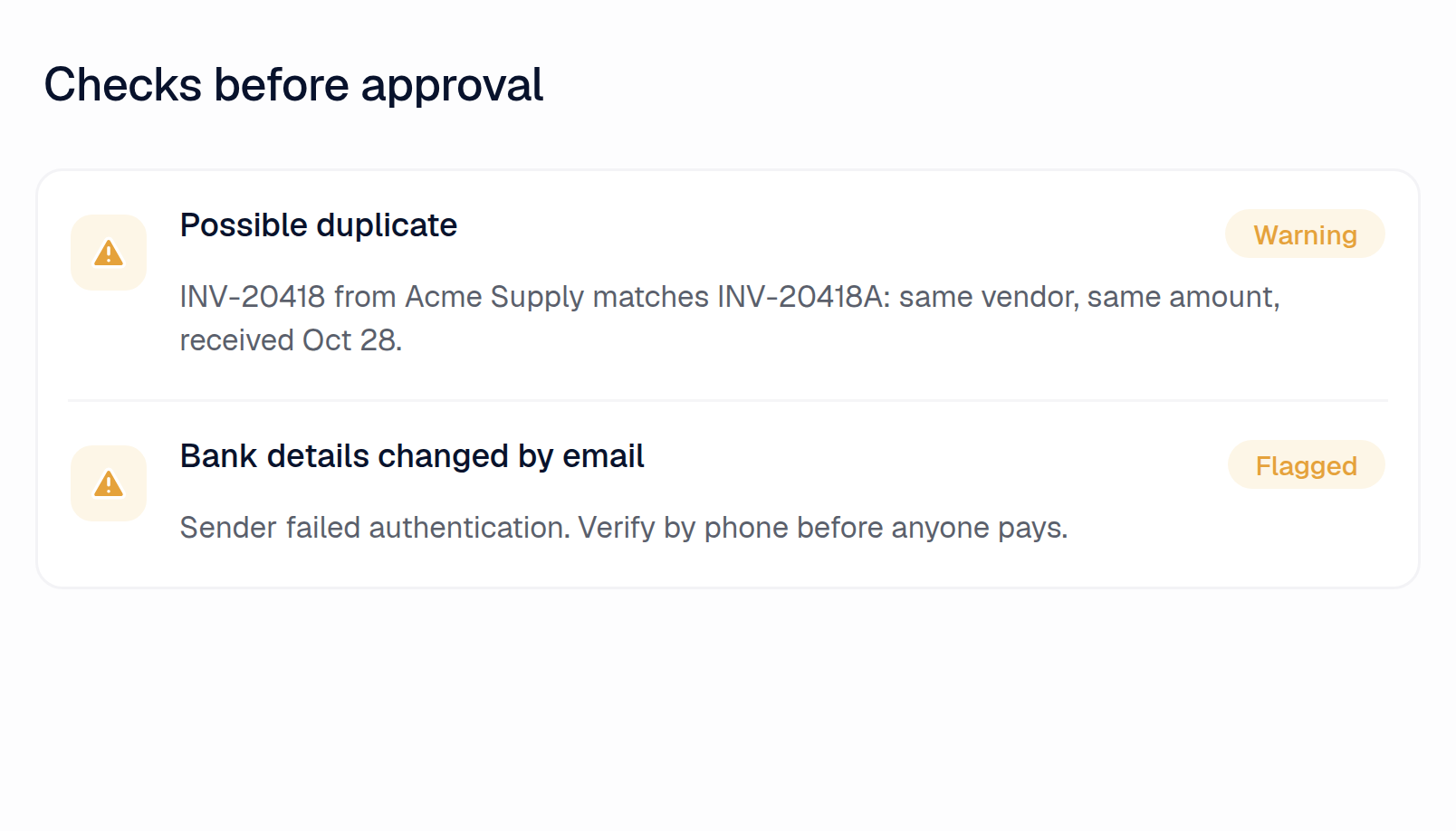
The same bill comes back with a new number, or under a second vendor record
Clerked
Caught, and checked against bills already in your ERP
Stampli
No. Its duplicate check matches exactly on vendor, invoice number, amount and date, so a changed number gets through.7
"Why was this coded that way?"
Clerked
Every invoice explains in plain English what was checked, what matched and which of your rules applied
Stampli
No. While Stampli says Billy explains what he did, it shows discrepancy details and single risk flags, not every check.19
Approvals
An approver is out on the floor or on the road
Clerked
Approves from the email on their phone. No password, no login
Stampli
No. While approvers can approve from the Stampli mobile app, signed in to their account, they can't approve straight from the email.20
A PO match fails
Clerked
Routed by which check failed, so it can go straight to the person who can fix it, like the buyer
Stampli
No. While exceptions follow your configured routes and the PO's receiver is prompted to confirm delivery, nothing sends a price gap to the buyer.21
Your AI analyst
The CFO asks what's stuck in AP and why
Clerked
Ask in plain English and get the answer, the invoices behind it and a spreadsheet
Stampli
No. While Stampli's dashboards show what's pending and Deep Finance takes plain-language questions, a question doesn't return the stuck invoices as a spreadsheet.22
Someone asks about an invoice, a vendor, a PO or a payment
Clerked
Ask Clark and it tracks down the answer, with links to the records
Stampli
No. While Deep Finance answers typed spend questions from invoices, vendors and payments, Billy is not a lookup chatbot.23
Spend by vendor, GL account or project
Clerked
Ask and get a table, a chart or an Excel workbook
Stampli
No. While you build spend reports in Stampli's report tool, plain-language analysis needs Deep Finance, a separate module.24
You need analysis your ERP's reports can't do
Clerked
Clark runs its own analysis: trends, outliers and spend forecasts with a likely range
Stampli
No. Analysis on request needs Deep Finance, a separate module returning summaries, breakdowns and an action plan.24
Month-end accruals: received but not billed
Clerked
Clark builds the accrual roll-forward from your POs, receipts and invoices
Stampli
No. While Stampli's procurement reports show open POs with unbilled receipts for accruals, it doesn't build the roll-forward from them.25
You want the same report every week
Clerked
Clark writes it on a schedule and emails it to your team
Stampli
No. Reports can be saved and exported as CSV or XLSX, but none is written on a schedule and emailed.26
Global
Invoices arrive in Swedish, French, Spanish, German, Italian and more
Clerked
Read with no setup
Stampli
No. Stampli doesn't list the invoice languages it reads. Its own guide says language support "varies by implementation".27
Your team doesn't read the language an email is in
Clerked
Every email gets a short note in plain English on what it is and what it asks
Stampli
No. Stampli doesn't translate a foreign-language email or invoice for your team.15
A vendor writes in their own language
Clerked
Reply drafts follow the vendor's language, or the one your team chooses
Stampli
No. Your team writes each reply to a vendor on the invoice thread. Nothing drafts one in the vendor's language.9
Invoices in many currencies
Clerked
Each sent to your ERP in its own currency. Clerked already reads invoices in 31 currencies
Stampli
No. While each invoice takes the vendor's default currency from your ERP, someone changes it from a drop-down when a bill differs.28
You need the supplier's VAT or tax number
Clerked
Read off each invoice and used to find the right vendor
Stampli
No. Stampli says it is not a VAT or GST engine, and it doesn't check the supplier's VAT number.29
Your ERP
You run Epicor, SAP Business ByDesign, QAD or Blackbaud
Clerked
Connected today to Epicor Kinetic, SAP Business ByDesign, NetSuite, QAD and Blackbaud. Any other ERP, we build the connection
Stampli
No. Stampli has no ByDesign or QAD connection, and its Epicor and Blackbaud links are file syncs, not live connections.30
You want to see it work before you switch
Clerked
Runs alongside your current process first, on your own invoices
Stampli
No. Stampli says implementation takes weeks, but there's no parallel run on your own invoices first.31
Questions finance teams ask first

See the difference on your own invoices.
Send us a few of your vendors and we'll build your demo on them before we meet.
Sources
What Stampli does and doesn't do is based on Stampli's help center, documentation and product pages as of November 17, 2026. Features change. If something here is out of date, tell us and we'll fix it.
About our numbers
- 97.4%: Every field our agents fill in, at the header and on every line, as they first filled it, compared with the bill posted in the customer's ERP. Descriptions and memos aren't counted.
- 84.7%: Invoices that posted in the customer's ERP exactly as our agents first prepared them, with nothing but a description or memo changed. Approving doesn't count as a change.
- 5.3 min: Median time from an invoice email arriving to the invoice being coded, matched, checked and routed for approval.
- 99.8%: Invoices our agents exported that the customer's ERP accepted on the first attempt, with no failed export before it.
- 1. Stampli help: emailing invoices to Stampli
- 2. Stampli: AP Assignments
- 3. Stampli: vendor statement reconciliation
- 4. Stampli: fully automated invoice capture
- 5. Stampli: email invoice capture
- 6. Stampli: difficult invoice capture cases
- 7. Stampli: duplicate detection and fraud prevention
- 8. Stampli: payment status inquiries
- 9. Stampli: vendor messaging; Stampli public product pages (checked 18 Nov 2026)
- 10. Stampli: vendor portal
- 11. Stampli blog: Advanced Vendor Management
- 12. Stampli: how AI invoice processing works
- 13. Stampli: invoice matching types
- 14. Stampli: pricing
- 15. Stampli help center (searched 17 Nov 2026)
- 16. Stampli: PO matching
- 17. Stampli: credit memos in AP
- 18. Stampli: AI invoice coding
- 19. Stampli: Billy
- 20. Stampli: mobile and email approval
- 21. Stampli: NetSuite three-way matching
- 22. Stampli help: welcome to the help center
- 23. Stampli: Deep Finance
- 24. Stampli press release: Deep Finance
- 25. Stampli: procurement reports
- 26. Stampli: reports
- 27. Stampli: data extraction and AI capture FAQ
- 28. Stampli blog: US companies with international locations
- 29. Stampli: VAT and GST on international invoices
- 30. Stampli: Epicor integration
- 31. Stampli press release: three years of Advanced Vendor Management